
Arabic vs. Indian Digits and Fonts: What’s the Difference — and Why Does It Matter in Code?

The difference between ١٢٣ and 123 is not just visual — it’s a technical decision that affects rendering, SEO, and reader experience. A practical guide for Arab developers and writers.
Word count: ~1800 • Reading time: 8 minutes
Arabic vs. Indian Digits and Fonts
What’s the difference between ١٢٣ and 123 — and why does the choice matter in code?
In this article from Zy Yazan Platform, we’re kicking off a brand-new series: how to display numbers and financial data correctly in Arabic-language apps and websites. The first question — one that’s almost always overlooked — is: what’s the “right” number to begin with? Is it ١٢٣ or 123?
The answer isn’t “whichever you prefer.” It’s a technical and linguistic decision with real consequences for page rendering, search engines, and reader experience. Let’s work through it together from the ground up.
Part One: Where Did “Arabic Numerals” Actually Come From?
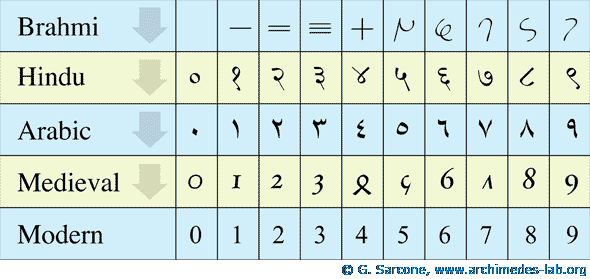
There’s a widespread misconception worth addressing carefully here — one that sits at the intersection of history and geometry. Arabs borrowed the decimal system and positional notation from India, but they developed two entirely distinct geometric forms for the digits. If you look closely, both systems base their shapes on the number of angles in each numeral.
Eastern Arabic digits (٠ ١ ٢ ٣ ٤ ٥ ٦ ٧ ٨ ٩): These are the digits you see in Arabic newspapers and books today. They evolved and were used across the eastern Arab and Islamic world, and are labeled in the Unicode standard as “Arabic-Indic” digits — or more precisely: Eastern Arabic numerals.
Western Arabic digits (0 1 2 3 4 5 6 7 8 9): These evolved in the Maghreb and Al-Andalus, and from there spread into Europe and eventually the entire world. They’re commonly called “Western” or “Arabic” numerals — though the Unicode label “Latin” is technically inaccurate, since true Roman/Latin numerals used alphabetic characters (I, II, III, IV, V, X, L, C, D, M) — a non-positional system with no zero.
It’s also worth noting that India’s own traditional numerals are the Devanagari digits (० १ २ ३ ४ ५ ६ ७ ८ ९), though in practice India uses Western digits today.
So both numeral systems in use across the Arab world are, in a meaningful sense, Arabic — shaped, refined, and completed with zero and the decimal system by Arab scholars. The difference between them is geographic: East versus West. Throughout this series, we’ll distinguish them by saying: Arabic-Indic digits (Eastern) versus Latin digits (Western).
That gives us two distinct numeral systems in Arabic digital text:
| Common Name | Digits | Unicode Name | Unicode Range |
|---|---|---|---|
| Latin digits | 0 1 2 3 4 5 6 7 8 9 | Western Arabic (Latin) | U+0030–U+0039 |
| Arabic-Indic / Eastern digits | ٠ ١ ٢ ٣ ٤ ٥ ٦ ٧ ٨ ٩ | Arabic-Indic (Eastern) | U+0660–U+0669 |
This distinction isn’t academic — it’s the foundation on which the Unicode standard builds its rules for how each digit is stored in memory and processed in code. The browser doesn’t see “twenty-three.” It sees two completely different code points: U+0032 U+0033 for Latin digits, versus U+0662 U+0663 for Arabic-Indic.
The digit you see on screen isn’t an image — it’s a character with a unique numeric identity in a global table of over one million symbols.
Part Two: When Should You Use Which?
There’s no absolute rule, but there is a well-established convention in contemporary Arabic writing:
| Context | Preferred System | Example |
|---|---|---|
| Arabic articles and journalism | Arabic-Indic (١٢٣) | Total cost: ١٥٠ riyals |
| Code and technical equations | Latin (123) | const price = 150; |
| URLs and slugs | Latin (123) | zyyazan.sy/article-2026 |
| Arabic invoices and official documents | Arabic-Indic (١٢٣) typically | Amount: ١٬٢٥٠ SAR |
| Multilingual apps | Determined by locale | ar-SA → Arabic-Indic / ar-MA → Latin |
Pay close attention to that last row: not all Arabic speakers use Arabic-Indic digits. Morocco, Algeria, and Tunisia use Latin digits in most written contexts, while Egypt, the Gulf states, and the Levant tend toward Arabic-Indic in formal text. This geographic variation — as we’ll see in the next article — is exactly what the Intl JavaScript API handles automatically.
Part Three: How Fonts Affect Digit Rendering
This is where the real programming problem begins. Most developers assume that Arabic-Indic digits will display correctly as long as they’re written into the code. In reality, rendering depends heavily on the font being used.
Arabic fonts fall into two categories in terms of digit support:
Fonts with Full Arabic-Indic Digit Support
These fonts include glyphs specifically designed for Arabic-Indic digits, so they render naturally and consistently alongside Arabic letterforms:
- Scheherazade New —
An open-source font from the SIL project, excellent for long-form text (٠ ١ ٢ ٣ ٤ ٥ ٦ ٧ ٨ ٩) - Amiri — (the body font used on this platform)
An elegant academic typeface used across many educational sites (٠ ١ ٢ ٣ ٤ ٥ ٦ ٧ ٨ ٩) - Noto Naskh Arabic —
Google’s most comprehensive and compatible Arabic font (٠ ١ ٢ ٣ ٤ ٥ ٦ ٧ ٨ ٩) - Lateef —
Sindhi in character, supports Arabic-Indic and Urdu digits (٠ ١ ٢ ٣ ٤ ٥ ٦ ٧ ٨ ٩)
Fonts That Fall Back to Latin Digit Rendering
Some popular Arabic fonts — especially those designed for screens — don’t include independent glyphs for Arabic-Indic digits. They fall back to Latin rendering automatically, even when the stored Unicode value is Arabic-Indic:
- Cairo — (the heading font used on this platform)
Widely used across Arabic websites, but renders digits as Latin (0 1 2 3 4 5 6 7 8 9) - Tajawal —
Lightweight and clean for screens, but has the same issue (0 1 2 3 4 5 6 7 8 9) - Almarai —
Widely used across the Gulf, digits render as Latin (0 1 2 3 4 5 6 7 8 9)
This means you could write ١٢٣ in your code, choose the Cairo font, and see 123 on screen — without changing anything yourself.
A font isn’t just aesthetics — it’s part of the rendering pipeline that determines how your content is actually read on screen.
Part Four: Controlling This in Code
We have two levels of control: CSS and JavaScript.
CSS — the font-variant-numeric property
CSS provides a specialized property for controlling how digits render within a given font:
/* Default — depends entirely on the font */
.arabic-content {
  font-variant-numeric: normal;
}

/* Forces equal-width digits — useful for financial tables */
.financial-table {
  font-variant-numeric: tabular-nums;
}

/* Old-style figures with varying heights — for literary text */
.old-style {
  font-variant-numeric: oldstyle-nums;
}
This property only works if the font itself supports these variants. The more reliable solution is choosing the right font from the start — or using JavaScript to convert digits programmatically.
JavaScript — manual digit conversion
If you need to guarantee Arabic-Indic rendering regardless of font, you can convert programmatically:
// Convert Latin digits to Arabic-Indic
function toArabicIndic(number) {
  return number.toString().replace(/[0-9]/g, (d) => '٠١٢٣٤٥٦٧٨٩'[d]);
}

// Convert Arabic-Indic digits to Latin
function toLatinDigits(number) {
  return number.toString().replace(/[٠-٩]/g, (d) =>
    '٠١٢٣٤٥٦٧٨٩'.indexOf(d)
  );
}

// Examples
console.log(toArabicIndic(2026));  // → ٢٠٢٦
console.log(toArabicIndic(150.5)); // → ١٥٠.٥
This approach is reliable but manual, and becomes a burden in larger projects. That’s exactly why Intl.NumberFormat exists — and it’s the subject of our next article.
Part Five: How Digit Choice Affects SEO
A question many site owners ask: do Arabic-Indic digits affect search engine visibility?
The precise answer: yes, but indirectly.
Search engines distinguish between ٢٠٢٦ and 2026 in exact-match queries. If a user searches for “profits ٢٠٢٦” and your page only contains “profits 2026,” the match may not be ideal. Google has become smart enough to connect the two systems in many contexts — but consistency within a single page is always better.
For slugs and permalinks, the rule is absolute: always use Latin digits. Arabic-Indic digits in URLs cause encoding and sharing problems.
Part Six: Thousands Separators and Decimal Marks — A Detail Often Missed
In financial writing, large numbers need separators to be readable. But those separators vary by region:
| Region | Thousands Separator | Decimal Mark | Example: 12345.6 |
|---|---|---|---|
| Saudi Arabia / UAE / Egypt | ٬ (Arabic thousands separator) | ٫ (Arabic decimal separator) | ١٢٬٣٤٥٫٦ |
| Morocco / Tunisia / Algeria | , (comma) | . (period) | 12,345.6 |
| Parts of Europe (French influence) | non-breaking space | , (comma) | 12 345,6 |
Imagine building an invoice system for one client in Saudi Arabia and another in Morocco. If you hardcode the separators, you’ll be wrong for one of them by definition. The only sustainable solution is letting the locale determine these separators automatically — which is exactly what we’ll build in the next article.
Summary and Next Step
Everything we covered in this article comes down to three core points:
- The two systems are different in code: Arabic-Indic and Latin digits aren’t two visual styles of the same thing — they’re independent code points in Unicode
- The font controls the rendering: your font choice can change how digits appear on screen regardless of what you typed
- Separators vary by region: there’s no single “Arabic” format for large numbers — the right solution is using locale rather than hardcoded values
Recommended next step:
Continue with: Localizing Numbers and Dates with Intl.NumberFormat and Intl.DateTimeFormat
References and Sources:
- Unicode Standard — Arabic Block: unicode.org — Arabic Block U+0600
- History of numerals and counting systems: Archimedes’ Lab Project
- MDN Docs —
font-variant-numeric: developer.mozilla.org - Noto Fonts project by Google: fonts.google.com — Noto Naskh Arabic
- Amiri open-source font: amirifont.org
Zy Yazan Platform © 2026
Localization Series
Financial Data Localization Guide — 4 Articles



Series: Financial Data Localization Guide — 4 Articles | Zyyazan Platform © 2026