Don’t Ignore Bing — Connecting Your Site to Bing Webmaster Tools

Ten minutes of setup opens your content to Bing, Yahoo, and DuckDuckGo at the same time — and there’s a feature most bloggers don’t know about: a direct import from Google Search Console that cuts the work in half.
You’ve connected your site to Google Search Console — an excellent first step. Now we complete the setup with a ten-minute process that extends your reach across three search engines at once.
Bing Webmaster Tools is Microsoft’s free tool for site owners — the counterpart to Google Search Console, built for Bing. What makes it more valuable than it might appear is that Bing powers Yahoo search results and a portion of DuckDuckGo‘s results behind the scenes. Connecting to Bing automatically extends your visibility across all three.
Connecting to Bing doesn’t just take ten minutes — it multiplies your digital footprint with a single action.
What Bing Webmaster Tools Gives You
The tool offers a set of reports and features that parallel Google Search Console, with a few useful additions:
- Performance report: The keywords bringing users to your site through Bing and Yahoo, with clicks and impressions data.
- Indexing report: Pages Bing has indexed and any errors it encountered.
- Keyword research tool: Bing offers built-in keyword research directly inside the tool — a free feature that Google Search Console doesn’t provide in the same way.
- Backlink reports: Sites linking to yours — useful for understanding your site’s authority.
- Direct URL submission: Request immediate indexing of a specific page without waiting for the crawler.
Step One: Create an Account and Sign In
Go to bing.com/webmasters and sign in. You can use:
- A Microsoft account (Outlook or Hotmail)
- A Google account
- A Facebook account
Use the same account you rely on for managing your other digital tools — keeping everything in one place makes your workflow simpler over time.
Step Two: Add Your Site — And the Feature Most Bloggers Miss
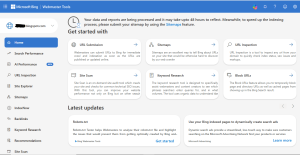
On your first visit, you’ll see two options for adding your site:
Option One: Import from Google Search Console
This is the feature most bloggers never discover — Bing lets you import your site, settings, and sitemap directly from Google Search Console in just a few clicks. If you completed the steps in the previous article, this option cuts the remaining work in half.
Here’s how:
- On the welcome screen, click “Import from Google Search Console.”
- Sign in with the Google account that holds your Search Console data.
- Select the property you want to import.
- Bing will automatically pull in your site address, sitemap, and verification — everything in one go.
- Wait a few minutes for the import to complete.
That’s it. If the process runs smoothly, your site is added, verified, and linked to its sitemap — all at once.
Option Two: Manual Setup
If you prefer manual setup or run into any issues with the import:
- Click “Add your site manually” and enter your full site address.
- Choose a verification method — the easiest for WordPress users is the HTML meta tag, which works exactly as described in the Google Search Console article.
- Copy the code and paste it into RankMath or Yoast under the Bing Webmaster Tools field.
- Save your settings and click Verify in Bing.
Step Three: Submit Your Sitemap (If Not Auto-Imported)
If you chose manual setup or the sitemap wasn’t pulled in automatically:
- From the left menu, go to Indexing → Sitemaps.
- Enter your sitemap address: https://yourdomain.com/sitemap_index.xml
- Click Submit.
Bing will begin processing your sitemap and visiting your pages within a few days.
The URL Submission Tool — For Anyone Who Wants Speed
One of the most practical features in Bing Webmaster Tools is URL Submission — found in the left menu under Indexing.
Every time you publish a new article or update older content, you can enter the direct link and request immediate indexing — instead of waiting for the crawler, which can take days or weeks. Bing gives you a daily allowance of URLs you can submit, which is more than sufficient for most bloggers.
For advanced users: Bing Webmaster Tools also supports IndexNow — an open protocol that automatically notifies participating search engines (Bing, Yandex, and others) the moment you publish new content, with no manual URL submission needed. RankMath supports IndexNow for free through its settings.
Bing vs. Google Search Console — Which Is Better?
This isn’t a competition — it’s a complement. The two tools work together, not against each other:
- Google Search Console gives you the most comprehensive and accurate data — because Google handles the vast majority of searches.
- Bing Webmaster Tools gives you a window into a different audience, plus a built-in keyword research tool that Search Console doesn’t offer.
- Some of Bing’s backlink data can fill gaps that Google’s reporting occasionally leaves.
The investment is small, the return is real. There’s no reason to leave it undone.
Every search engine you connect to is another window through which readers can find you. Don’t close free windows.
In the next article, we look at a search engine that deserves special attention from an Arabic content perspective — Yandex, and whether it’s worth your time.
Previous in the series: Step by Step — How to Connect Your Blog to Google Search Console
Next in the series: Yandex and the Arabic-Speaking Audience — Is It Worth the Effort?