Web Anatomy: What is the Difference Between Landing Pages, Blogs, and Portfolios?

A comprehensive guide to website types and structures: landing pages, blogs, portfolios, and professional sites, and how to choose the right architecture for your goal before building anything.
Word Count: ~2400 · Reading Time: 12 minutes
Website Anatomy
The Difference Between Landing Pages, Blogs, and Portfolios — And How to Choose the Right Structure Before Building Anything
Note to the Reader: This article is completely independent, and you can apply everything in it regardless of other pieces. However, if you have not launched your website yet, we recommend reviewing our first article in the series: How to Launch Your Website on WordPress and Blogger Without Experience.
When someone decides to create a website, they usually rush to search for the “best WordPress theme” or the “most beautiful website design,” often spending hours choosing colors and fonts, only to build a site that fails to achieve what they want. This is not because the design is bad, but because they chose the wrong structure from the very beginning. In this article from Zy Yazan Platform, we will learn how to think about website structure before its visual appearance, and we will explore the main types of websites, what distinguishes each, and where people make mistakes when using them.
The Most Important Question: What Do You Want Your Visitor to Do?
Before any discussion about website types, there is one question you must answer clearly: When someone enters your site, what is the single action you want them to take?
The answer might be: I want them to contact me. Or: I want them to buy. Or: I want them to read and follow. Or: I want them to see my work and trust my expertise. It could also be: I want them to sign up for my mailing list. Every one of these answers leads you to a different website architecture, and when you choose the wrong structure, you confuse the visitor and lose a real opportunity.
A website that tries to do everything at once does nothing efficiently. Clarity of purpose is the starting point, not visual design.
First: The Landing Page
What is a Landing Page?
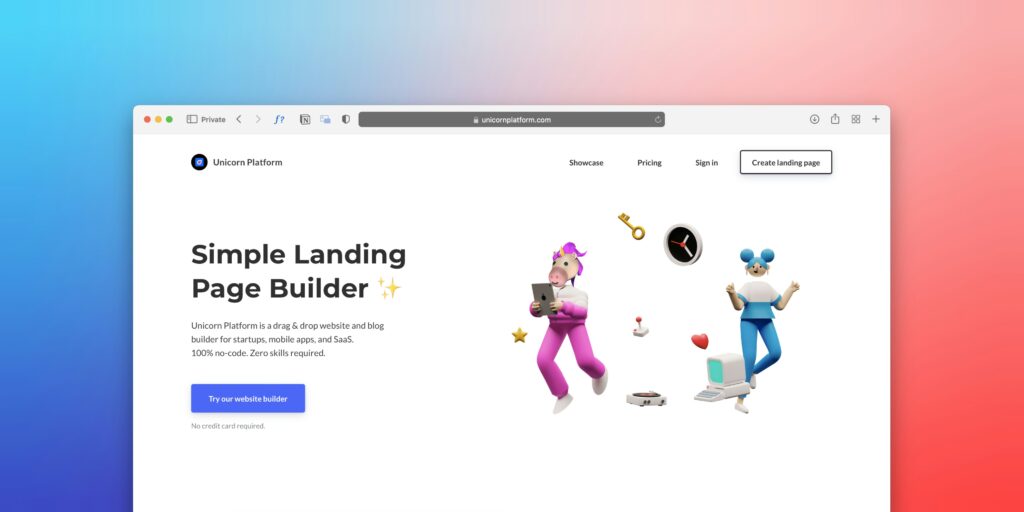
A landing page is a single web page designed for one specific goal, and visitors usually reach it via a link in an advertisement, an email, or a social media post. Every element on it — the headline, the image, the text, and the button — is engineered to lead the visitor toward a single action called a “Call to Action” (CTA) in marketing, whether it is purchasing a product, registering for a webinar, downloading a file, or simply entering an email address.
Why “Landing”?
The name comes from the idea that the visitor “lands” on this page coming from somewhere else, such as a Google or Facebook ad, and does not reach it through typical browsing. This means it does not need a navigation menu, numerous links, or diverse content, as all these elements distract the visitor from the original objective.
Components of an Effective Landing Page
A professional landing page usually carries these elements in this order: a main headline that communicates the value proposition immediately, a subheadline that explains and supports it, an image or video that visually reinforces the concept, bullet points briefly explaining the benefits, testimonials or social proof that build trust, a clear button for the required action, and finally, addressing common objections such as money-back guarantees or privacy policies.
When Do You Need a Landing Page?
You need it when you launch a new product or a specific service and want to promote it using paid ads, when you host an event or a webinar and want to register participants, or when you display a special offer for a limited time. A restaurant opening a new branch needs a landing page to announce it, and a designer launching a training course needs a landing page to sell its seats.
Landing Pages and Free Platforms
The good news is that you can build an effective landing page on WordPress or even on free versions of platforms like Wix and Squarespace. These two are considered complete website platforms, even though their designs focus heavily on visual, single-page layouts. When your business grows and you require deeper integration with marketing tools and payment systems, you can transition to specialized landing page solutions.
Second: The Blog
What is a Blog in a Business Context?
A blog in the context of business and digital presence is not a personal diary or literary writing; it is a strategic tool for building trust and appearing in search engines. When a doctor writes articles on preventing seasonal illnesses, or a financial consultant writes about managing family budgets, or an interior designer writes about common lighting mistakes, all of this is “blogging” in the technical sense, even if the authors do not call it that.
The Difference Between a Blog and a Static Site
A static website, such as a portfolio or a corporate informational page, does not change much over time. A blog, on the other hand, is organic and frequently updated. Every time you publish new content, you give search engines a reason to re-crawl and index your site. This constant renewal is what makes a blog a powerful tool for organic, long-term online visibility.
The Architecture of a Professional Blog
A professional blog typically includes: a homepage displaying the latest or featured articles, an “About Us” page introducing the site owner or organization, categories to organize content by topic, a contact page, and a search bar. You might also add a mailing list to notify subscribers of new posts, turning a casual visit into a permanent audience.
When Do You Need a Blog?
You need it when your goal is to build authority and thought leadership in your field over time, when you want free visibility in search engines without relying completely on paid ads, or when you have regular, valuable insights to share with your target audience. A lawyer explaining the law to the public, a fitness trainer teaching workout techniques, and an agricultural expert publishing seasonal tips all benefit from a blog more than any other type of website.
Third: The Portfolio
What is a Portfolio?
A portfolio is a website that says with images and case studies what is hard to say with words: “This is how I work, and this is what I can do for you.” It is the most suitable format for anyone selling creative expertise or skill-based services, such as designers, photographers, developers, illustrators, architects, and writers.
Portfolio vs. Resume
A resume tells about your past and your credentials, whereas a portfolio demonstrates your actual value. A company looking for a graphic designer wants to see their designs, not just know how many years they studied. This makes a portfolio a near-mandatory element for any freelancer or creative professional looking to attract clients online.
Components of an Effective Portfolio
A professional portfolio includes: a short and clear personal bio, samples of your best work with a brief description of each project and its context, contact information in a prominent place, and ideally, testimonials from previous clients. A common mistake is including too much work; displaying twenty mediocre pieces is worse than showcasing five exceptional ones.
Single-Page Website Builders and Portfolios
Platforms like Wix and Squarespace show their true strength here. While WordPress is more flexible in the long run, these two platforms are fundamentally designed to produce beautiful, highly visual sites with less technical effort, which perfectly suits portfolios that rely heavily on aesthetics. A common critique of them is the limited code customization, which matters to a developer but generally does not matter to an artist.
Fourth: The Informational or Corporate Website
What is an Informational Website?
An informational website is what people usually call a “company website”: static pages that explain what the organization or individual does, what services or products they offer, and how to get in touch. It is closer to an electronic brochure than a blog or portfolio, and its primary goal is to say: “We exist, this is what we do, and this is how you reach us.”
When is an Informational Website Enough?
It is perfectly sufficient when your business relies on local trust, reputation, and word-of-mouth more than search engine discovery, such as restaurants, medical clinics, and retail shops that people primarily find via Google Maps or personal recommendations. In this case, the informational website serves as a confirmation of credibility rather than a primary tool for lead generation.
The Informational Site with a Blog: The Golden Combination
The most common and effective solution is to integrate an informational corporate site with a blog into a single web presence. The static pages introduce you and your services, while the blog drives search engine traffic and builds gradual trust. This is what most successful professional websites do, and WordPress is natively designed to serve this hybrid model excellently.
Fifth: Specialized Sites and the Right Tools
In addition to these foundational types, there are specialized sites that should be mentioned because people often try to emulate them using inappropriate tools.
E-commerce Websites
An online store requires entirely different tools: a shopping cart system, a payment gateway, and inventory management. WordPress provides this via the WooCommerce plugin, but this functionality usually requires independent hosting rather than entry-level free plans. Platforms like Shopify are built from the ground up for e-commerce and are much easier for a beginner in this specific field, though they are strictly paid platforms.
Educational and Course Sites
If you want to sell training courses or password-protected content, you need a Learning Management System (LMS) or a specialized educational platform, which is the subject of the third article in this series. Free tiers of general blogging platforms do not provide this out of the box natively.
Event or Temporary Project Sites
A conference, exhibition, or festival needs a website for a limited period. This is exactly where single-page builds on Wix or Squarespace excel: quick to deploy, visually beautiful, and easy to decommission later.
Comprehensive Comparison: Which Structure Suits You?
| Website Type | Primary Goal | Best Suited For | Best Platform to Start | Free Tier Available? |
|---|---|---|---|---|
| Landing Page | Single specific action | Product launch, event, special offer | Wix, Squarespace, WordPress | ✅ Partially |
| Blog | Audience building & SEO visibility | Experts, educators, journalists | WordPress, Blogger | ✅ Fully |
| Portfolio | Showcasing creative expertise | Designers, photographers, freelancers | Wix, Squarespace, WordPress | ✅ Partially |
| Informational Site | Credibility and contact | Clinics, corporate firms, local shops | WordPress, Wix | ✅ Partially |
| E-commerce | Direct selling | Merchants, artisans, creators | Shopify, WordPress + WooCommerce | ❌ Paid Only |
| LMS / Education Platform | Selling protected content | Trainers, educators, academics | Thinkific, Teachable, WordPress + LMS Plugins | ❌ Paid Only |
The Most Common Mistake: Misplaced Complexity
One of the most frequent mistakes we see among beginners is starting with a website that tries to be everything at once. You find a portfolio, a landing page, a blog, a store, and a booking system packed together. It ends up as a bloated site that performs nothing well, is difficult to maintain, and completely confuses the visitor.
The solution is to start with a smart MVP (Minimum Viable Website): a site that answers one question clearly and gives the visitor one obvious path forward. Then, you scale and expand it gradually based on what your audience actually asks for, not what you imagine they need.
A website launched simple that evolves over time is far better than a website that waits for perfection and never launches. The internet is a space for iteration, not a stage for a single, perfect opening night.
Real-World Scenarios to Help You Decide
The doctor who wants new patients: Needs an informational corporate site with static pages outlining their specialty, services, and clinic hours, integrated with a medical blog to showcase expertise, and a landing page if they launch a specific new program.
The freelance photographer: Needs a portfolio first and foremost, with a “Book a Session” page that functions as a landing page, an “About Me” page, and a clear method of contact.
The restaurant owner: Needs a clean informational site with the menu, location, operating hours, and interior photos. That is entirely sufficient; a blog is a secondary asset that can be added later if desired.
The trainer selling online courses: Starts with a landing page for each course, paired with a blog that builds authority in the long run, transitioning to an educational platform once they have a substantial content catalog.
The news or niche publication site: A blog is its primary core structure, with static pages added for key topical departments and a “Subscribe to Newsletter” callout that acts as a lightweight landing page.
WordPress, Wix, and Squarespace: Which One to Choose?
This is a question many ask, and the short answer is: WordPress offers the highest flexibility and fits almost all types when you are ready to learn; Wix is faster and visually accessible for a beginner who wants a portfolio or a landing page without technical friction; Squarespace offers premium visual elegance specifically suited for designers and artists, though it becomes purely subscription-based after its free trial.
The vital part is not to fall into the trap of thinking about the platform before thinking about the structure. Select your architecture first, then choose the platform that can implement it with the least amount of effort.
Summary and Next Steps
Today, we learned that a website is not a single uniform entity, but a family of distinct architectures, each serving a unique purpose, toolset, and audience. We explored landing pages designed for conversion, blogs built for long-term growth, portfolios that convince through concrete examples, and informational corporate sites that establish market presence and credibility. Above all, we learned that the primary question is always “What do I want my visitor to do?” and not “What is the most beautiful design template I can pick?”
Recommended Next Step:
Now that you understand your website’s architecture, you might wonder: What if I want an interactive site where users register, subscribe, and access exclusive content? How does that work? Join us in the next article: Interactive Sites: How to Design a Website with a Subscription and Paid Membership System, where we will explain the structures of gated websites and how to build an interactive community online.
If you are currently mapping out the content that will fill your site and want to write it professionally, we recommend checking out our series in the Blogging Guide, specifically the article: How to Choose Your Blog Niche Before Writing a Single Word.
References and Sources:
- Official WordPress Documentation: WordPress.com Support
- Wix Documentation for Beginners: Wix Support Center
- Squarespace Help Center: Squarespace Help Center
— Web Design Guide —
Previous Article: 1- Blogging
Current Article: 2- Web Anatomy
Next Article: 3- Interactive Websites
Similar Series: Blogging Guide | Multimedia Blogging Workshop | SEO Guide