
The Structural Language: Learn HTML Basics to Build Your First Web Page by Hand

A practical introduction to HTML for absolute beginners: what are the essential tags, how to build a solid structure for any page, and where HTML stops and what lies beyond.
Word Count: ~1,800 · Reading Time: 9 minutes
The Blueprint of the Web
Learning HTML Basics to Build Your First Web Page From Scratch — Code Isn’t a Mystery, It’s Just a Recipe
Editor’s Note: This guide is entirely standalone. All you need to get started is a standard web browser and a simple text editor. However, if you want the bigger picture—where HTML fits into the grand ecosystem of web development and what you actually need to build a digital presence—we highly recommend checking out the second article in this series: The Anatomy of the Web: Understanding Landing Pages, Blogs, and Portfolios.
Whenever you open a website, right-click, and select “View Page Source,” you are greeted by lines of text filled with characters like <h1>, <p>, and <div>. This is HTML. What might look intimidating at first glance is actually nothing more than a straightforward system for putting elements exactly where they belong on a screen. In this guide from Zy Yazan Platform, we will break down this system from the absolute ground up and build a real, functioning web page by the end of it.
What is HTML and What Does It Actually Do?
HTML stands for HyperText Markup Language. If you strip away the technical jargon, it means exactly one thing: the language of structure. The sole responsibility of HTML is to answer a single question for the browser: What is this specific piece of content? Is it a main heading, a paragraph, an image, a link, or a list?
HTML does not dictate how an element looks—that is the job of CSS, which we will cover in our fifth article. It also doesn’t define what an element does when a user clicks it—that is the domain of JavaScript. These three technologies form the foundation of the modern web, and HTML is the bedrock upon which everything else stands.
Think of HTML as the skeleton of a building—the concrete walls, support beams, and floors. CSS represents the paint, flooring, and interior decor, while JavaScript acts as the automated doors, wiring, and elevators. No amount of premium paint can keep a wall standing if the structural framework isn’t there.

Why HTML Isn’t “Programming” (And Why That’s Good News)
This distinction is crucial because it eliminates a massive barrier to entry for beginners: HTML involves no logic, no complex math, no conditional statements, and no loops. It consists entirely of tags that describe what things are. Consequently, it is the only web language that anyone can pick up in a single afternoon and get immediate, visual results.
If you have ever learned a few basic phrases in a foreign language just to get by, you already possess the cognitive skills required here. HTML is far simpler than any spoken language; it has a rigid, highly predictable structure that never changes its rules.
The Anatomy of a Tag: Opening and Closing
Almost everything in HTML relies on a simple mechanism: tags tell the browser where an element begins and where it ends. An opening tag is written inside angle brackets, like <p>. A closing tag looks identical but includes a forward slash before the element name, like </p>. Your actual content sits neatly in the middle.
Let’s look at a live example:
<p>This is a standard paragraph of text.</p>
<h1>This is a primary headline.</h1>
<h2 style="color: #c0392b;">This is a smaller subheadline that will appear in red.</h2>
When a browser reads this code, it processes the tags instantly: the first item is treated as body copy, the second as the most critical header on the page, and the third as a secondary header with custom color properties.
Self-Closing Tags
A handful of HTML elements do not require a closing tag because they don’t enclose any text content. Instead, they inject an element directly onto the page at their exact position. For instance, an image tag doesn’t wrap text; it points directly to an external file:
<img src="photo.jpg" alt="A clean workspace with a laptop open" />
<br />   <!-- Forces a line break -->
<hr />   <!-- Drops a horizontal divider line -->
The Core Tags That Power 90% of the Web
While the web uses dozens of specialized elements, the vast majority of production websites rely on a core set of ten to fifteen tags. Master these, and you can build almost any layout:
| Tag | What It Represents | Common Use Case |
|---|---|---|
<h1> ... <h6> | Headings ranging from level 1 (largest) to level 6 (smallest) | Article titles, major sections, and sub-sections |
<p> | Paragraph | Standard blocks of body text |
<a> | Anchor (Link) | Hyperlinks to other pages, sites, or specific sections |
<img> | Image | Embedding photos, graphics, or illustrations |
<ul> / <ol> | Unordered (bulleted) / Ordered (numbered) lists | Feature lists, navigation items, or step-by-step guides |
<li> | List Item | Individual entries inside a <ul> or <ol> block |
<div> | Division (Generic layout container) | Grouping elements together for styling or structural layout |
<span> | Inline Container | Styling a single word or phrase within a larger sentence |
<strong> / <em> | Bold emphasis / Italic emphasis | Highlighting critical keywords or terms inline |
<table> | Data Table | Displaying structured rows and columns using <tr> and <td> |
<form> / <input> | Interactive Form and Form Field | Contact forms, search bars, and user inputs |
Understanding Attributes: Providing Vital Context
Many tags require additional settings to function. A link tag needs to know exactly where to send the user when clicked, and an image tag needs a file path. These configurations are called attributes, and they are always placed right inside the opening tag.
<!-- Links: 'href' defines destination, 'target' controls opening behavior -->
<a href="https://zyyazan.sy/" target="_blank">Visit Zy Yazan Platform</a>

<!-- Images: 'src' is the path, 'alt' provides a fallback text description -->
<img src="images/workspace.jpg" alt="Minimalist desk setup with laptop and notebook" />

<!-- Inputs: 'type' sets field context (text, email, password) -->
<input type="email" placeholder="Enter your business email" />
A Quick Note on Comments: When you need to leave notes inside your code that are completely invisible to web visitors, wrap them in the comment syntax: <!-- Your comment here -->.
The alt attribute on images deserves strict attention. It is not an optional feature for clean code. It serves three critical functions: it allows screen readers to accurately describe visuals to visually impaired users, it gives search engine spiders context to index your images accurately, and it displays on screen if a user has a slow connection and the image fails to load.
The Mandatory Skeleton of an HTML Document
Every professional web page follows a strict structural blueprint. This overarching code structure informs the browser about everything it needs to know before it begins rendering content: what version of HTML is being processed, the language configuration, the tab title, and where external style rules exist.
<!DOCTYPE html>
<html lang="en" dir="ltr">

<head>
  <meta charset="UTF-8" />
  <meta name="viewport" content="width=device-width, initial-scale=1.0" />
  <title>Page Title Displayed in Browser Tab</title>
</head>

<body>
  <!-- Every visual element shown to the reader lives here -->
</body>

</html>
Let’s break down exactly what these required elements do:
<!DOCTYPE html> — This isn’t actually an HTML tag; it is an explicit instruction telling the browser that the page is built on modern HTML5 standards.
lang="en" dir="ltr" — Sets the primary language of the document to English and layout flow to Left-to-Right, ensuring consistent font rendering and text alignment across devices.
<head> — A structural folder holding background parameters that visitors never see directly. It houses character encodings, titles, SEO configurations, and style sheets.
charset="UTF-8" — Ensures every special character, symbol, and unique alphabet system renders perfectly without turning into unreadable symbols.
viewport — A critical meta tag that forces the layout to adapt natively to mobile dimensions instead of displaying a tiny, shrunk-down desktop layout on phone screens.
<body> — The sandbox where all your user-facing content lives: your text, layouts, forms, images, and embedded resources.
Semantic HTML: Why You Shouldn’t Use Generic Elements for Everything
Technically, you could construct an entire web page by nesting generic <div> blocks inside one another. However, modern web standards rely on **Semantic HTML**—using tags that carry inherent real-world meaning. The visual difference between a basic <div> and a <header> is non-existent out of the box; both act as invisible boxes. The true value lies in what they signal to search engine indexers, assistive tools, and other developers reading your source files.
<body>
<header>
<!-- Website Header: Logo and primary menu navigation -->
<nav>
<a href="/">Home</a>
<a href="/about">About Us</a>
</nav>
</header>
<main>
<!-- The core unique content of this specific page -->
<article>
<h1>The Structural Blueprint</h1>
<p>Article text content goes here...</p>
</article>
<aside>
<!-- Sidebar content: Related articles, callouts, or sign-up forms -->
</aside>
</main>
<footer>
<!-- Site Footer: Copyright claims and secondary links -->
<p>Zy Yazan Platform © 2026</p>
</footer>
</body>Search crawlers favor clean, semantic markup because it lets them parse page hierarchy without wasteful processing. Writing clean code directly translates into better search ranking visibility over time.
Your First Complete Web Page: Try It Now
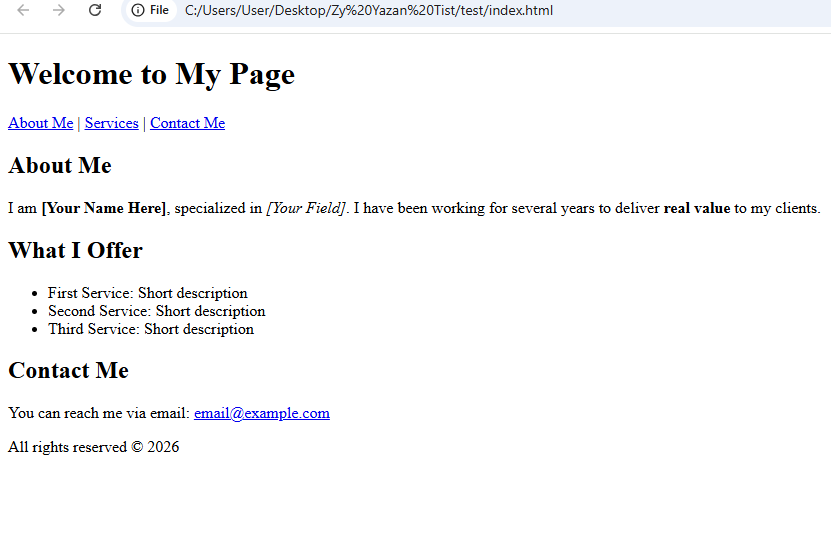
Open any basic text editor; such as Notepad on Windows, TextEdit on Mac, a mobile text editing app (like Spck Editor or QuickEdit) if you are using your phone, or VS Code if you have it installed. Next, copy this complete code and save the file as index.html. Finally, open the file by double-clicking it (or through the file manager on your phone), and it will open directly in your browser as a real web page.
🛠️ Important Note for Converting Your File to a Web Page:
If you saved the file and it still opens as a regular text document, your operating system is automatically hiding file extensions. Follow these steps immediately:
- For Windows Users: Open the folder → Click on View at the top → Check the File name extensions option. Your file name will change to
index.html.txt, rename it and completely delete the.txtsuffix from the end.- For Mac Users: Click on the file → Choose Rename → Change the extension from
.txtto.htmland accept the confirmation prompt.Once you remove
.txt, the file icon will instantly change to your browser’s logo, and it is now ready to run as a real web page!
<!DOCTYPE html>
<html lang="en" dir="ltr">
<head>
<meta charset="UTF-8" />
<meta name="viewport" content="width=device-width, initial-scale=1.0" />
<title>My First Web Page</title>
</head>
<body>
<header>
<h1>Welcome to My Page</h1>
<nav>
<a href="#about">About Me</a> |
<a href="#services">Services</a> |
<a href="#contact">Contact Me</a>
</nav>
</header>
<main>
<section id="about">
<h2>About Me</h2>
<p>
I am <strong>[Your Name Here]</strong>, specialized in
<em>[Your Field]</em>. I have been working for several years to
deliver <strong>real value</strong> to my clients.
</p>
</section>
<section id="services">
<h2>What I Offer</h2>
<ul>
<li>First Service: Short description</li>
<li>Second Service: Short description</li>
<li>Third Service: Short description</li>
</ul>
</section>
<section id="contact">
<h2>Contact Me</h2>
<p>
You can reach me via email:
<a href="mailto:email@example.com">email@example.com</a>
</p>
</section>
</main>
<footer>
<p>All rights reserved © 2026</p>
</footer>
</body>
</html>The page you will see will look very visually basic—black text on a white background—and this is completely normal and intentional. HTML alone does not beautify; it only structures and organizes. The styling comes with CSS in the fifth article, and you will be amazed at how much CSS changes the look of this page with just a few lines.
The code you just wrote is exactly what every web page on the internet is built upon—from the simplest blogs to the massive websites. The difference is in the details, not the principle.
Common Pitfalls Every Beginner Should Avoid
Most beginner errors in markup fall into a single bucket: an opening tag without a corresponding closing tag, or syntax items that overlap out of logical order. Modern browsers try hard to repair broken layout structures automatically behind the scenes, but counting on the browser to clean up bad syntax leads to highly erratic rendering across different screen types and device platforms.
Other persistent errors include neglecting to close a comment block properly using -->, using stylized smart quotes rather than standard straight developer quotes (" ") for attribute boundaries, and omitting descriptions from the alt property. To check your work automatically, drop your raw code snippets directly into the W3C’s free industry-standard evaluation environment at validator.w3.org to catch underlying errors instantly.
A Note for WordPress Content Creators
If you create content in WordPress and occasionally drop into the raw Code Editor mode, mastering these structural building blocks gives you complete command over tricky design overrides. However, keep in mind that WordPress natively wraps its own underlying block layouts around your basic HTML text fields. For authors who want to study HTML specifically to clean up publishing bugs, handle tables perfectly, or embed rock-solid layout frameworks, review our targeted guide: Code Writing: A Blogger’s Guide to Taming HTML Beasts, which is packed with production-ready copy templates.
HTML and Search Engines: The Architecture of Visibility
Search engine algorithms don’t read articles the way a regular user does. They scan the source code code structure to build an index. An explicit <h1> tag tells Google exactly what the main topic of the page is, the <title> property dictates the exact headline that appears in search engine results pages, and an image’s alt data acts as the descriptive lens through which search systems understand structural visuals.
Consequently, semantic HTML is the true foundational layer of Technical SEO. Architectural errors in your layout code carry a direct penalty in search engine ranking efficiency. To explore building highly visible platforms from the source up, explore our deep-dive series: SEO Guide.

Summary and Actionable Next Steps
Today, we unpacked how HTML functions purely as the structural language of the web—detached from design layout and behavioral execution. We explored how opening and closing boundaries govern content, and built an absolute production-ready file using standard headings, links, sections, and structural footers.
Recommended Next Step:
Keep your brand new index.html code file open on your computer screen and jump right into our next milestone technical article: Visual Craftsmanship: Converting Raw Structural Outlines into Stunning Web Pages Using CSS. We will attach clean layout parameters, brand typography, and responsive spacing profiles to the exact HTML foundation you constructed today.
Verified References and Documentation:
- Official Web Docs HTML Reference: MDN Web Docs HTML Specifications
- Industry Markup Code Verification Tool: W3C Markup Validation Service
- Semantic HTML Development Standards: WHATWG HTML Living Standard Group
— The Web Design Blueprint Series —
Previous Article: 3 – Interactive Websites
Current Article: 4 – The Structural Language: HTML Basics
Next Article: 5 – Visual Craftsmanship
Explore Parallel Tracks: Blogging Guide | Multimodal Blogging | SEO Guide
Zy Yazan Platform © 2026
Freelancer Workshops
Web Design Guide — 14 Articles










Series Web Design Guide — 14 Articles | ZYYAZAN Platform © 2026